How to Translate WhatsApp Web Messages, Step by Step
By TapScriber Team
Updated 7 min read
Published

To translate WhatsApp Web messages you need a browser extension, because WhatsApp Web doesn’t have a translate button. As of October 2026, WhatsApp’s built-in translation only works in the Android and iPhone apps, with no date for desktop. With TapScriber installed, a Translate button shows up under every message in another language, and a small bar above the message box translates your reply before you send it. Setup takes less than a minute.
Follow the five steps below. After them come the alternatives that need no install, and fixes for the usual problems.
Can you translate WhatsApp Web messages without an extension?
Not with a WhatsApp feature. In September 2025 WhatsApp rolled out message translations on phones. You long press a message and tap Translate, with six languages on Android and 19 or more on iPhone. It never came to WhatsApp Web or the desktop app, and it’s built for reading what you receive (on Android even automatically), not for writing back in another language. We cover the details in Does WhatsApp have a translator?
Without an extension you can still copy and paste into a translator, or ask your browser to translate the whole page. Both work, with real limits we’ll get to. If you message in another language more than once in a while, an extension saves a lot of tab switching.
What you need
- A computer with Chrome, Edge, Brave or another Chromium browser. Firefox and Safari aren’t supported.
- WhatsApp open at web.whatsapp.com, linked to your phone with the QR code.
- That’s it. You don’t need an account to try it, since you get 30 guest translations.
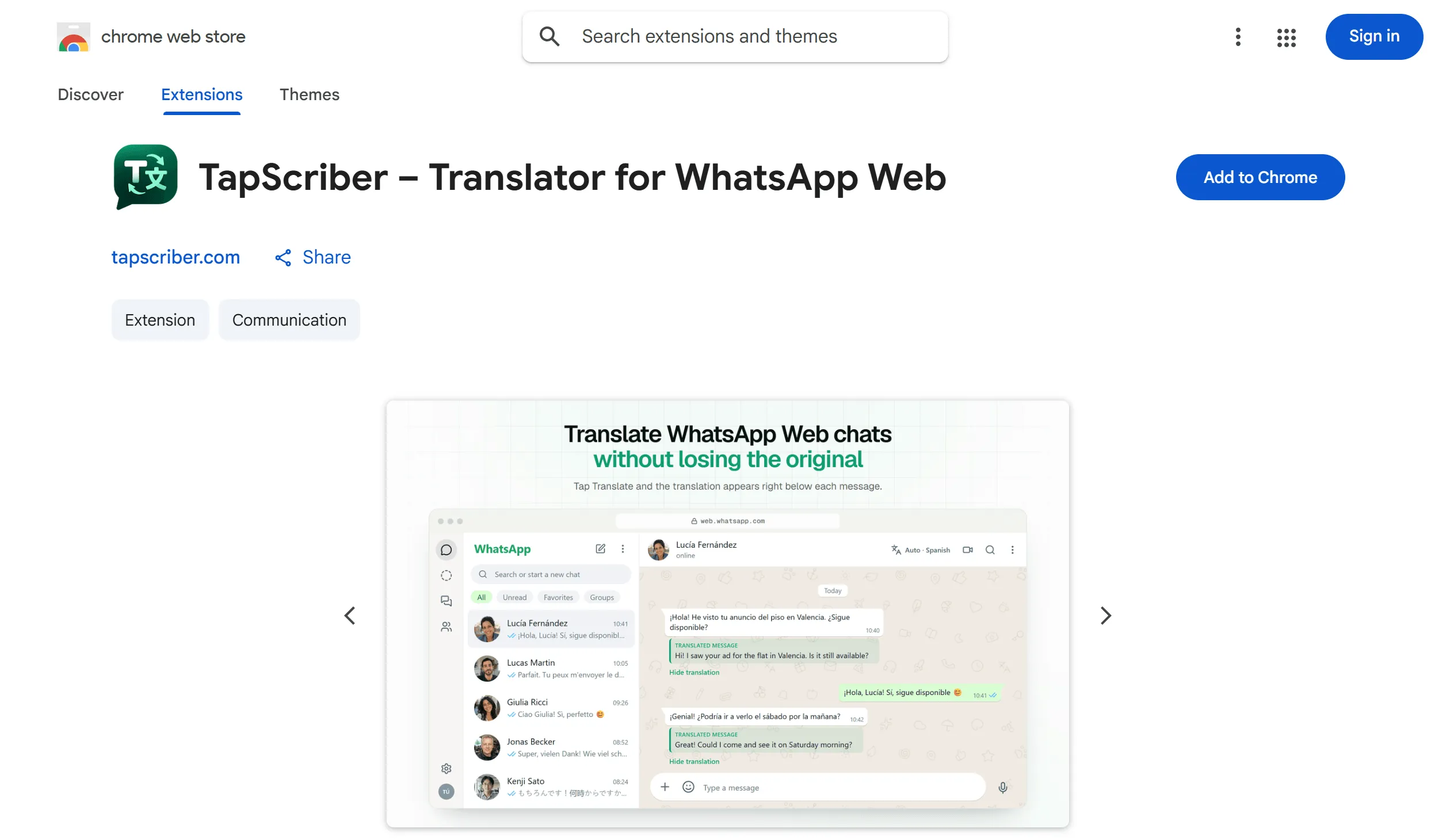
1. Add TapScriber from the Chrome Web Store
Open TapScriber on the Chrome Web Store and click Add to Chrome. Brave uses the same button. In Edge, the first time you’ll be asked to allow extensions from other stores. Accept, then click the button again.
If you want quick access to the settings, pin the TapScriber icon from the puzzle piece menu in your toolbar.
2. Open WhatsApp Web and check your language
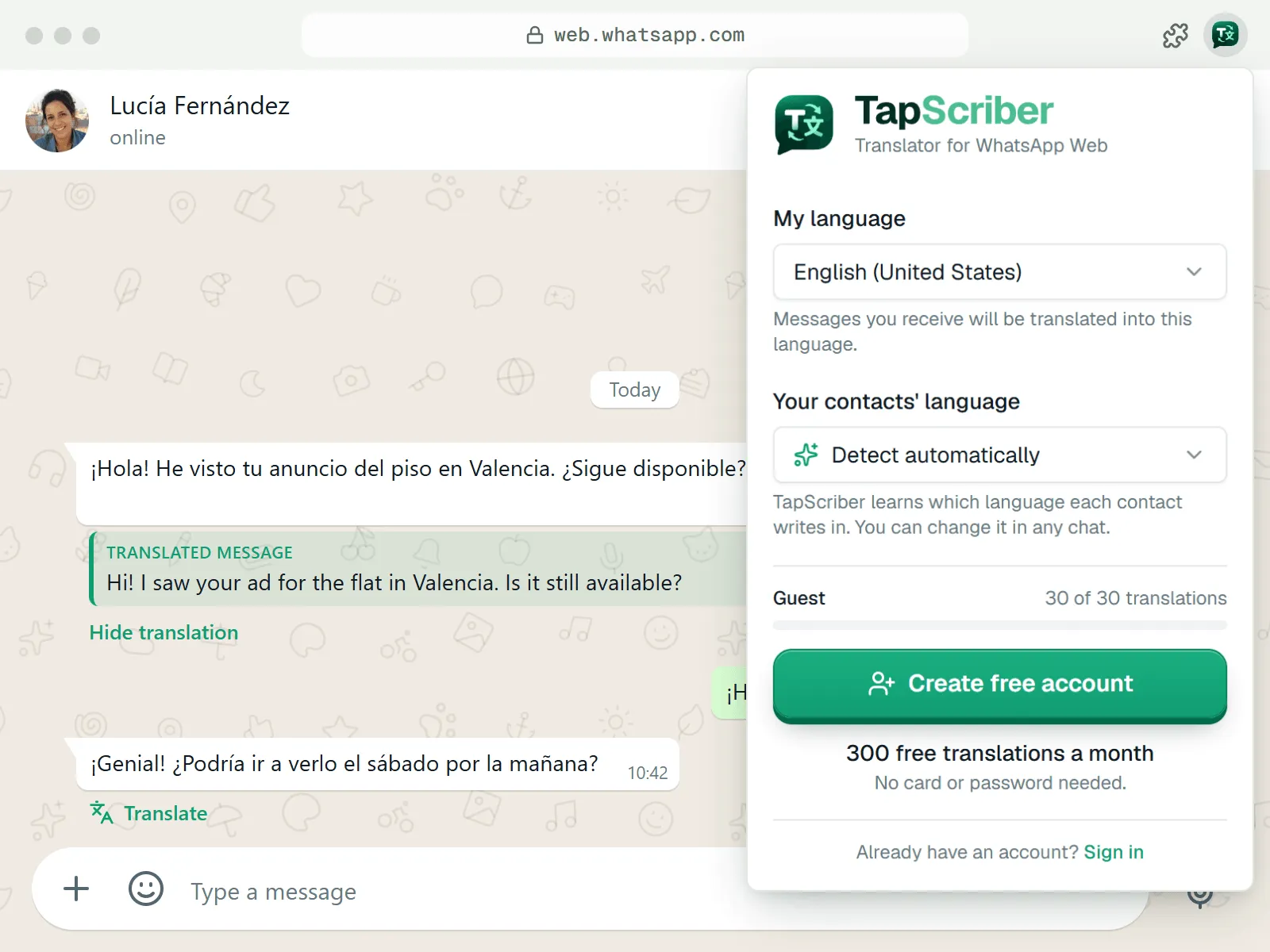
Go to WhatsApp Web as usual. If it was already open, reload the tab (F5 or Cmd+R) so the extension can load. There’s nothing to set up.
TapScriber uses your browser language as “My language”, which is the language incoming messages get translated into. To change it, click the extension icon. The same panel has “Your contacts’ language”, set to “Detect automatically” by default so each chat learns its own.
3. Click Translate under a message
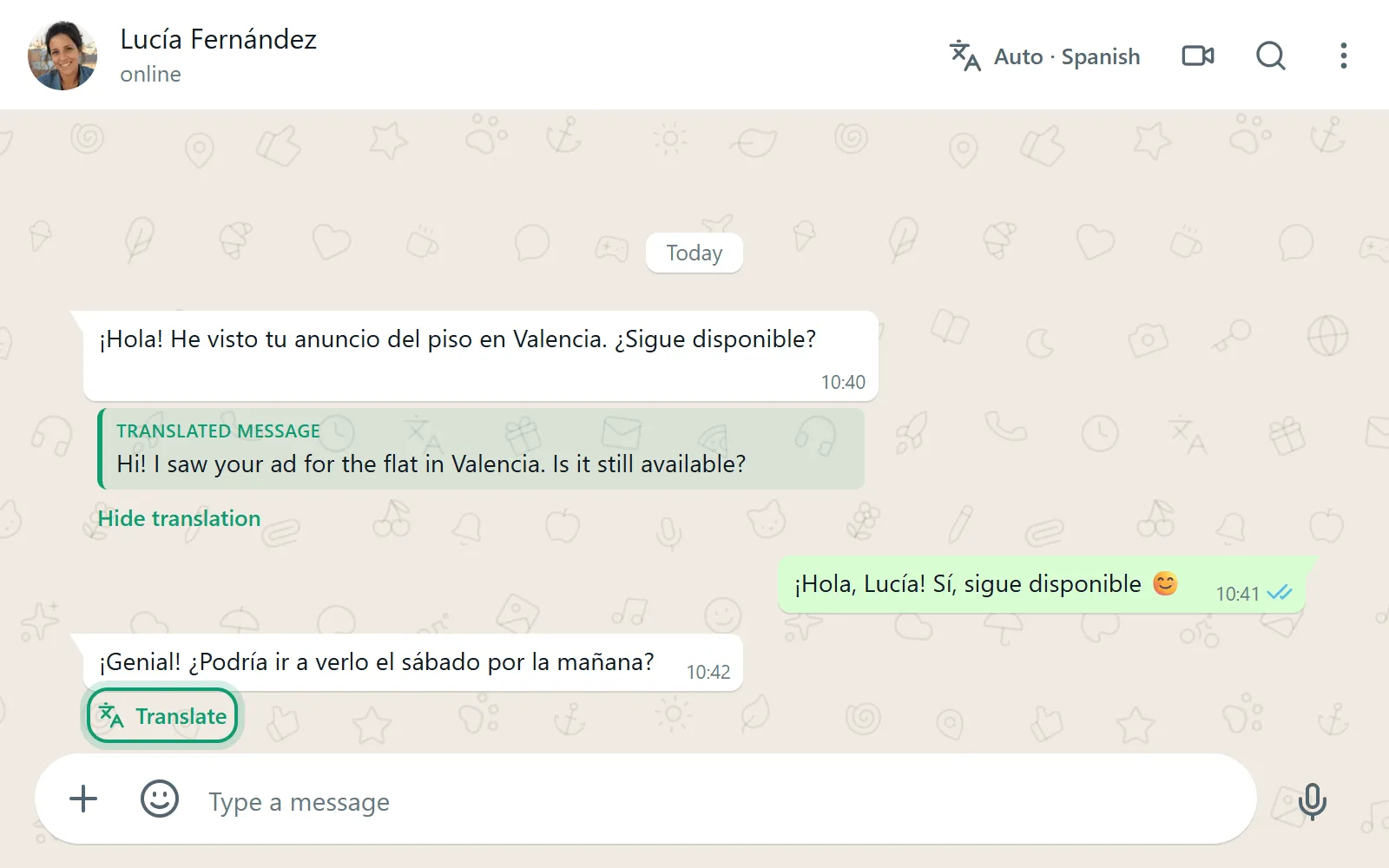
Open a chat with messages in another language. Each one gets a Translate link underneath. Click it and the translation appears right below the original in a box labeled “Translated message”, so you can read both. “Hide translation” tucks it away and “Show translation” brings it back.
Messages already in your language don’t get the button, so you don’t spend translations on things you can read. Very short messages like “ok” or “lol” are often too short to identify, so TapScriber looks at the language of the whole chat and only offers Translate when it’s different from yours.
4. Write your reply in your language and review it
Type in WhatsApp’s message box the way you always do, in your own language. A bar appears above it that says “Translate to Spanish” (or whatever language that chat uses) with a Translate button. Click it to see a preview of the translation.
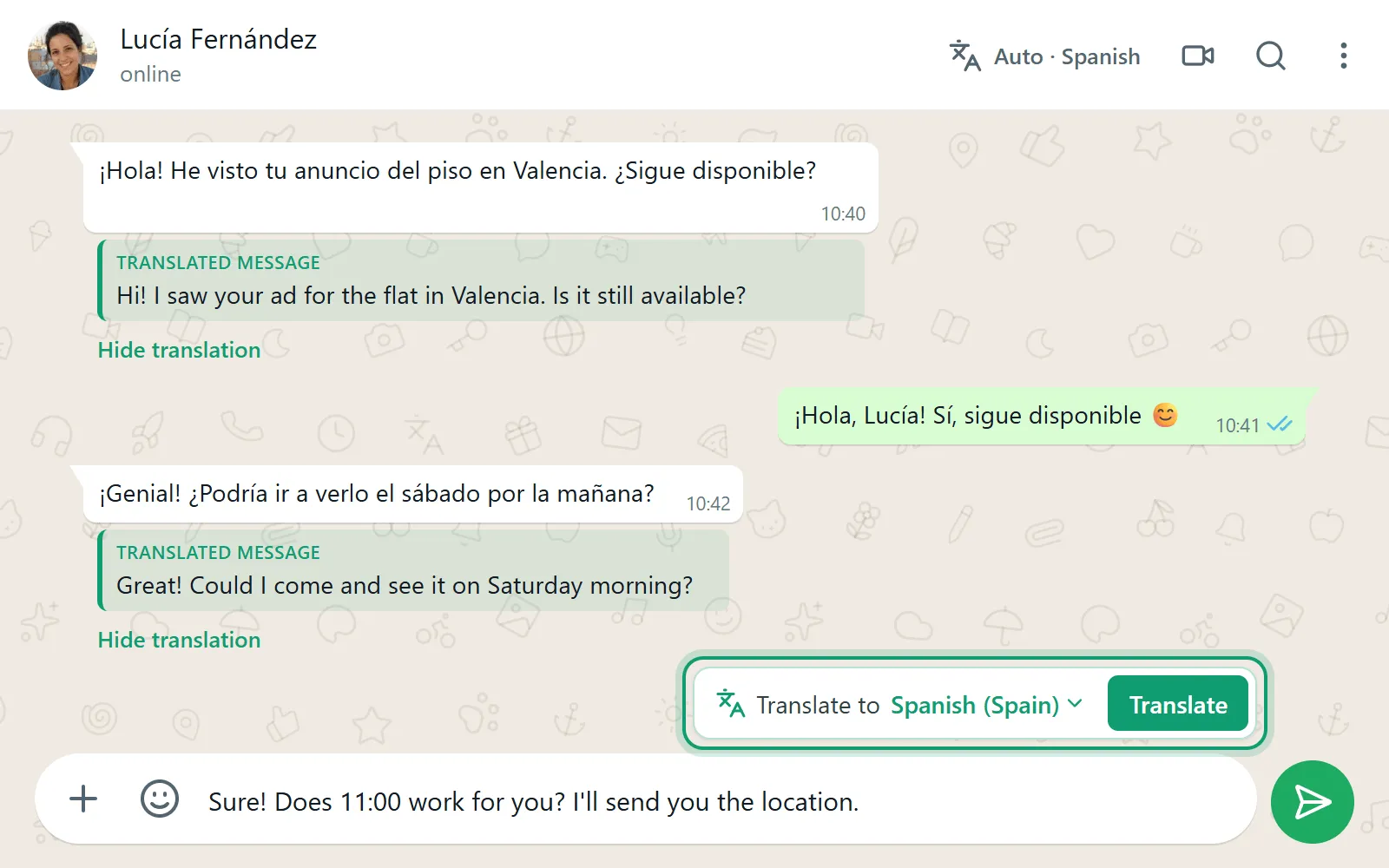
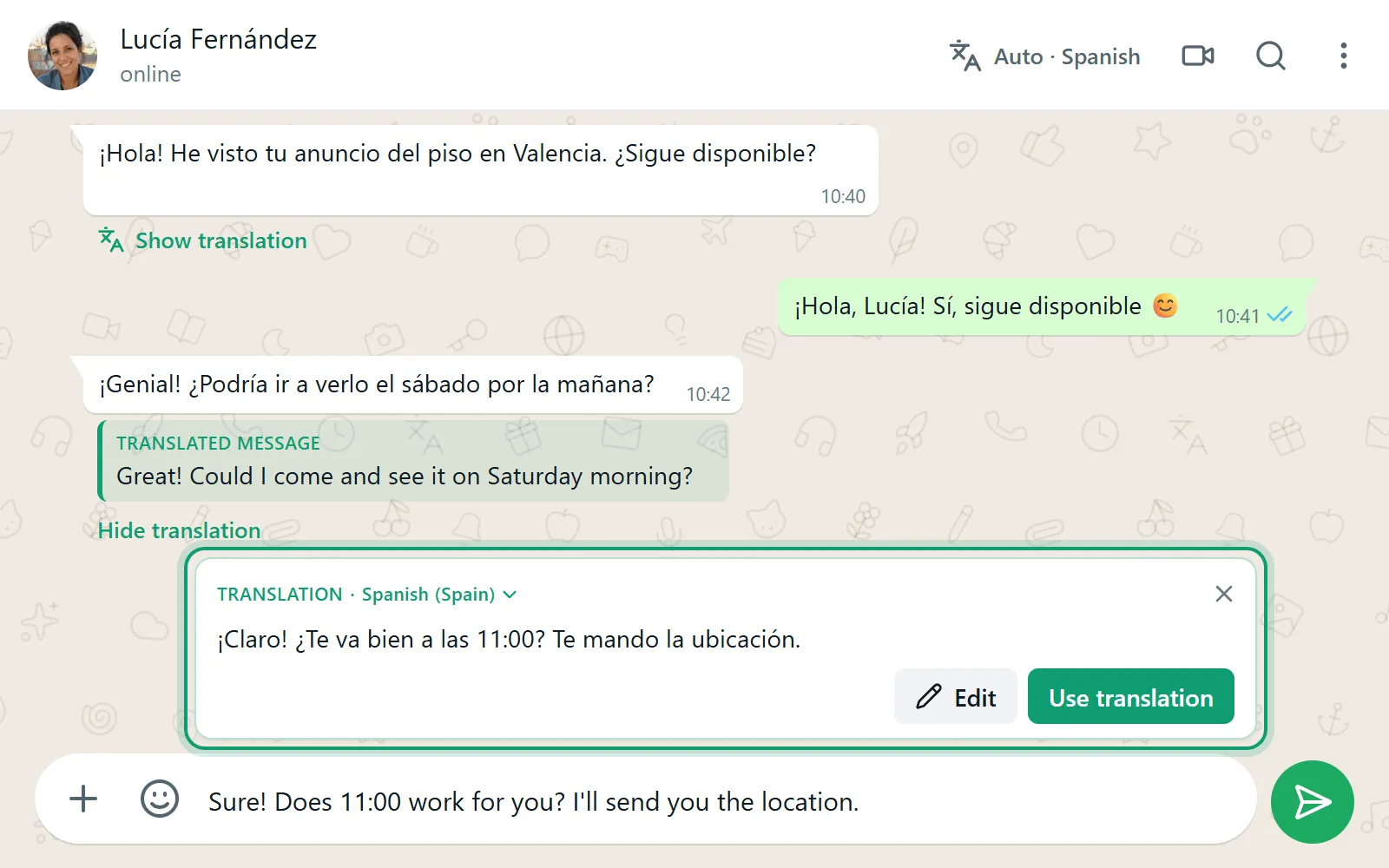
- To tweak the wording, click Edit, make your changes and click Done.
- When it looks right, click “Use translation”. TapScriber swaps your draft for the translated text and shows “Translation ready to send.”
- Press send in WhatsApp when you’re ready. TapScriber never sends anything on its own.
If you change the draft after translating, the bar tells you “You changed the draft” and offers “Translate again”. You can also switch the target language by clicking the language name in the bar.
5. Set the language per chat if needed
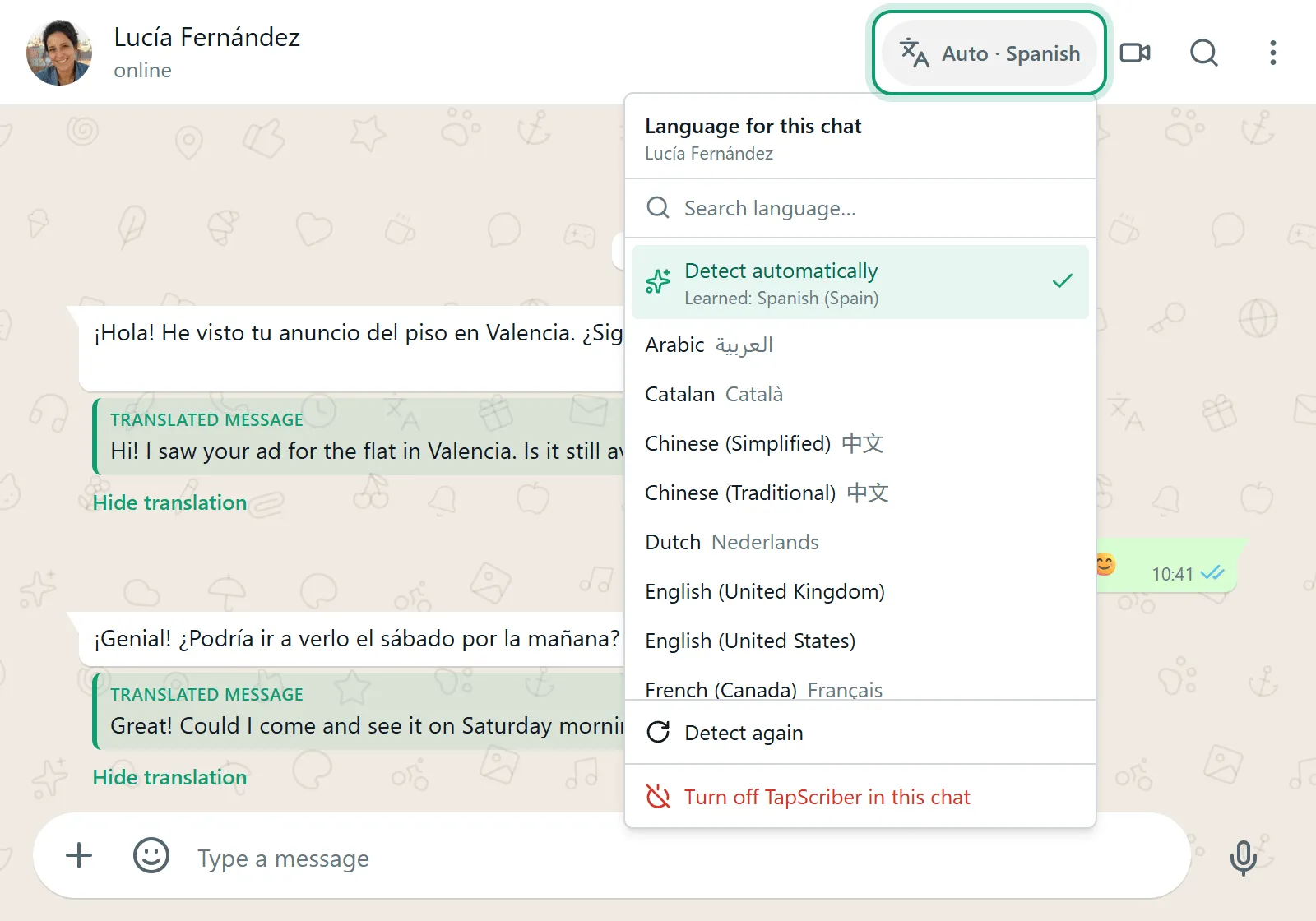
In each chat header, next to the video call button, TapScriber adds a language button that reads something like “Auto · Spanish”. It learns the language from the messages that person sends you and, before there are enough, from their phone number’s country code. Every chat keeps its own setting, so you can write Spanish to a supplier and French to a friend without touching anything.
From that button you can pick a language by hand, click “Detect again”, or choose “Turn off TapScriber in this chat” for conversations where you don’t need it.
Group chats work a little differently. Every message is translated into your language no matter who wrote it, and you choose which language you reply in for that group.
Other ways to translate WhatsApp on a computer
For a one-off message you don’t need an extension at all. Here’s what actually exists and where each option falls short.
| Method | What it translates | The catch |
|---|---|---|
| Copy and paste into Google Translate or DeepL | Any message, and your replies | About seven steps per message and constant tab switching |
| Browser page translation (right-click, “Translate to English”) | Whatever is on screen | Also translates menus and contact names, replaces the original text and ignores what you type |
| Highlight text, then “Translate selection” in Chrome | One snippet at a time | Good for reading, no help with replying |
| Other WhatsApp Web extensions | Varies | Quality, upkeep and privacy vary a lot |
Copy and paste is the most dependable for occasional use, but it gets old fast in a real back-and-forth. Page translation is handy for skimming a chat, though you lose the original wording and the message box stays untouched, so you’re on your own when replying.
The Chrome Web Store has several WhatsApp Web translator extensions, a few from known names like DeepL and many from small developers. We compare them in the best WhatsApp Web extensions. Before installing any of them, check when it was last updated, what permissions it asks for and what its privacy policy says about your message text. Anything that runs on WhatsApp Web can see the page, so it matters who built it. For phone methods as well, see how to translate WhatsApp messages.
What happens to your messages
It’s the right question to ask before adding anything to WhatsApp. Here’s what TapScriber actually does.
- Only the message you click Translate on, or the draft you choose to translate, is sent to our server. The extension doesn’t read the rest of the conversation, your chat list or your contacts.
- Message text isn’t stored, not in the database and not in server logs. Each translation leaves only content-free metrics such as the languages and the character count.
- Links, phone numbers, prices, dates and reference numbers are protected before translation so they don’t get changed along the way.
- Recent translations stay in your browser’s memory for up to 60 minutes and are cleared when you close it.
The full details are in the privacy policy. TapScriber is an independent product and isn’t affiliated with WhatsApp or Meta.
Troubleshooting
I don’t see the Translate button
Reload WhatsApp Web after installing or updating the extension. Make sure TapScriber is enabled in chrome://extensions and that you didn’t turn it off for that chat from the header button. Messages already in your language don’t show the button.
The bar asks which language the contact writes in
That happens when the chat is on automatic and there aren’t enough messages yet to tell. Click “Choose language” and pick one. It’s saved for that chat.
The translation looks wrong
Check the chat language in the header. If detection got it wrong, set it by hand or click “Detect again”.
It says I’ve used my guest translations
The 30 no-account translations are gone. Create a free account with Google or an email code (no card, no password) and you get 300 translations a month, renewed on the 1st. If you translate every day, the Pro plan has no limits.
It couldn’t insert the text into the chat
Occasionally WhatsApp won’t accept the text in its message box. Click Copy in the bar and paste it yourself.
I use the WhatsApp desktop app on Windows or Mac
Desktop apps don’t support extensions, so there’s no way to add a translator to them. Open web.whatsapp.com in your browser and link it with the QR code. You can keep both sessions open at the same time.
If your issue isn’t listed, the support page has more fixes and an email address that a real person answers.
Start translating WhatsApp Web
Until WhatsApp brings its translator to the desktop, an extension is the way to get a Translate button in the chat. TapScriber’s WhatsApp Web translator lets you read every message with the original in view and reply in the other person’s language without switching tabs. Your first 30 translations don’t need an account.
Frequently asked questions
Does WhatsApp Web have a translate button?
No. WhatsApp's own message translation only exists in the Android and iPhone apps. On WhatsApp Web and the desktop app you need a browser extension or a separate translator.
Can I translate my replies on WhatsApp Web before sending them?
Yes, with TapScriber. Type in your own language, click Translate in the bar above the message box, review or edit the result and click Use translation. You still press send yourself.
Is there a translator for the WhatsApp desktop app?
Not one that plugs into it. The Windows and Mac apps don't support extensions. Open web.whatsapp.com in Chrome, Edge or Brave instead and link it with the QR code.
Does it translate every message automatically?
No. Only the message you click Translate on, or the draft you choose to translate, is translated. What is automatic is language detection, and each chat remembers its language.
Is it free to translate WhatsApp Web with TapScriber?
Your first 30 translations are free with no account. A free account gives you 300 a month, and the Pro plan removes the limit.


