Does WhatsApp Have a Translator? Mobile vs WhatsApp Web
By TapScriber Team
Published 8 min read

Yes. Since September 23, 2025, WhatsApp has a built-in translator in its Android and iPhone apps. Long-press a message, tap Translate, and the text switches to your language right inside the chat. The catch is that it only lives in the phone app, it doesn’t translate what you type before you send it, and Android supports only a handful of languages. As of October 2026, WhatsApp Web and the desktop apps have no translator at all.
This guide covers how to turn it on and off on each phone, which languages it supports and why Translate sometimes doesn’t show up. At the end, a table compares mobile, WhatsApp Web and an extension.
What WhatsApp’s translation feature does (and doesn’t do)
WhatsApp calls it Message Translations and announced it on its official blog. The rollout was gradual, so not every account got it on the same day.
What it does
- Translates text messages in one-on-one chats, group chats and Channel updates.
- Translates on your phone using language packs you download once. WhatsApp says it can’t see those translations and the chat stays end-to-end encrypted.
- On Android, it can translate every new message in a chat automatically.
What it doesn’t do
- It doesn’t translate what you type before you send it. If you want to reply in another language, you still need another translator.
- It doesn’t translate voice messages. WhatsApp can transcribe voice notes in some languages, but the transcript stays in the original language.
- It skips locations, documents, contacts, stickers and GIFs, according to the WhatsApp Help Center.
- It isn’t available on WhatsApp Web or in the WhatsApp apps for Windows and Mac.
Which languages does WhatsApp translate?
It depends on your phone. Android uses WhatsApp’s own language packs and iPhone uses Apple’s built-in translation, which is why the lists don’t match.
| Android | iPhone | |
|---|---|---|
| Languages at launch (September 2025) | 6 (English, Spanish, Portuguese, Russian, Arabic and Hindi) | 19 or more, from Apple’s translation |
| Changes in 2026 | 13 more languages started testing in the beta in March | Up to 21 options, depending on your iOS version |
| Auto-translate a whole chat | Yes, chat by chat | No, one message at a time |
| Where translation happens | On your phone | On your phone |
On iPhone, the launch list covers English, Spanish, Portuguese, French, German, Italian, Dutch, Polish, Turkish, Ukrainian, Russian, Arabic, Hindi, Indonesian, Japanese, Korean, Mandarin Chinese, Thai and Vietnamese.
On Android, the 13 packs spotted by WABetaInfo in March 2026 are German, French, Italian, Dutch, Polish, Turkish, Ukrainian, Simplified Chinese, Czech, Indonesian, Latvian, Swedish and Urdu. WhatsApp hasn’t published an updated official list yet, so if you chat in French or German on Android you may still not see Translate. English and Spanish have worked on both platforms since day one, so translating WhatsApp from Spanish to English works on Android and iPhone alike.
How to turn on translation in WhatsApp
There’s no master switch in Settings. The option shows up when you long-press a message. First, update WhatsApp from Google Play or the App Store. These are the basic steps. If Translate doesn’t show up, or you also want to translate your replies, our guide on how to translate WhatsApp messages covers the Gboard, Galaxy AI and iOS Translate workarounds.
On Android
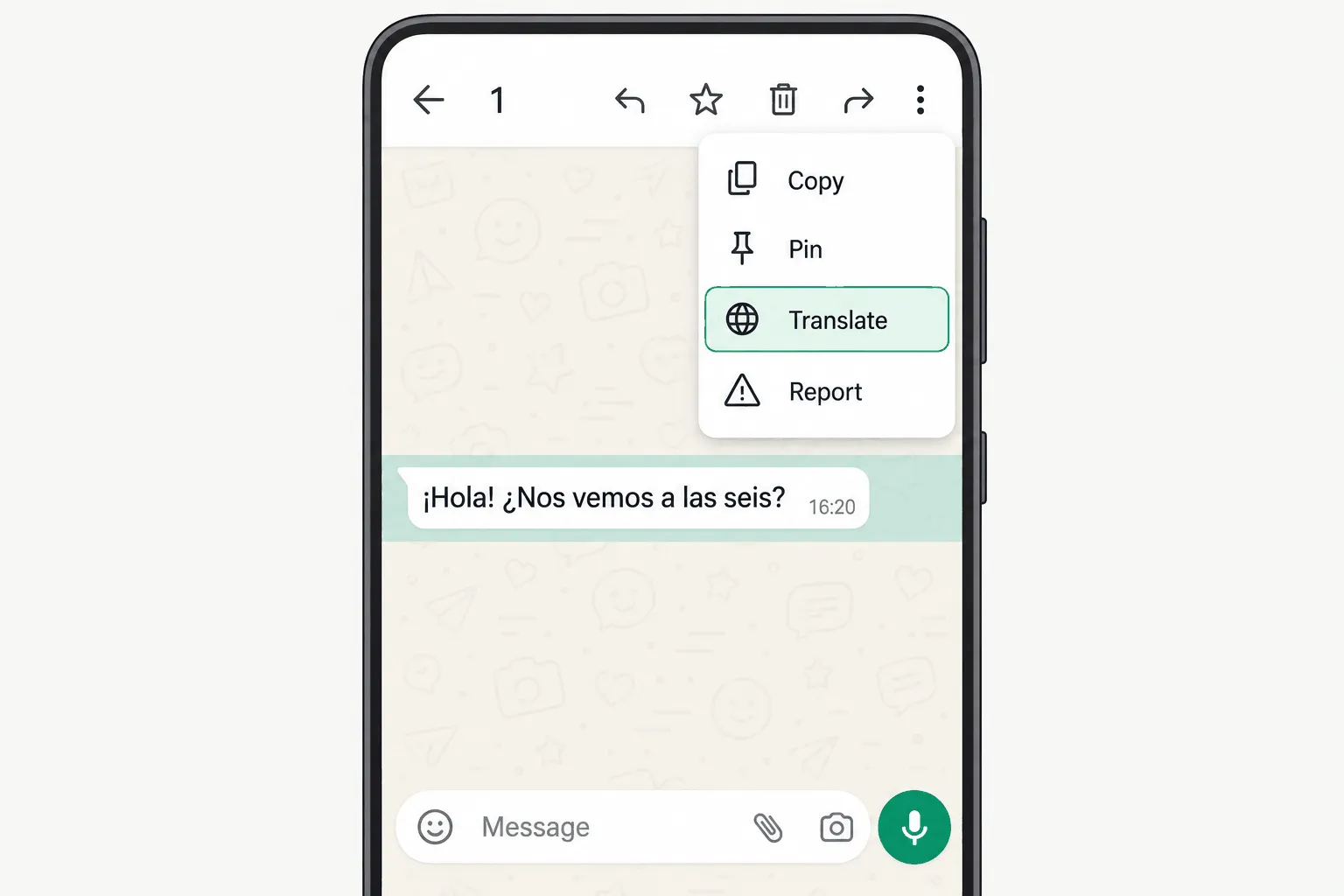
- Open the chat and long-press the message you want to translate.
- Tap the three-dot menu (⋮) at the top right and choose Translate. On some versions, Translate shows up as soon as you long-press.
- Pick the language to translate from and to. The first time, WhatsApp asks you to download the language pack.
- Tap Translate. The translation appears in the chat and the language pack stays saved for next time.
On iPhone
- Long-press the message.
- Tap More… and then Translate.
- Pick the languages and download the language if prompted.
Auto-translate a whole chat (Android only)
When you translate a message on Android, the language screen includes an option to translate all new messages in that chat. It’s set per conversation, and it works in group chats too. On iPhone you still translate one message at a time, since the iOS version WABetaInfo spotted in March 2026 hasn’t shipped. The full steps and limits are in our guide to WhatsApp auto translate.
How to turn off WhatsApp translation
Remove the translation from one message
Long-press the translated message and choose the option to view the original or remove the translation. It only changes what you see on your phone. Nobody else in the chat is affected.
Turn off auto-translate for a chat
- Open the chat and tap the contact or group name to open chat info.
- Look for the message translation option.
- Switch off automatic translation.
If you can’t find it there, translate any message in that chat and uncheck the option to translate new messages. Menu names vary a little between WhatsApp versions.
Why is WhatsApp translating my messages?
If you see translations you never turned on in WhatsApp, they usually come from your phone or keyboard, not from WhatsApp.
- On Samsung phones with Galaxy AI, chat translation is turned off in Settings > Galaxy AI.
- On some Google Pixel phones, the system’s Live Translate offers to translate text in other apps. You can change it in the phone’s Settings.
- If a Google Translate bubble pops up whenever you copy a message, that’s Tap to Translate. Turn it off in the Google Translate app settings (more in how to use Google Translate with WhatsApp).
- If it’s WhatsApp’s own translation, someone turned on auto-translate for that chat on your phone. Follow the steps above to switch it off.
WhatsApp translate not working or not showing? Common fixes
These are the usual reasons the Translate option is missing or the translation fails.
- You don’t have it yet. WhatsApp itself says the feature is only on certain devices and may not be available to you yet. Keep the app updated.
- The language isn’t supported on your phone. This is the most common one on Android, which launched with only six languages. If the message is in a language your version doesn’t support, Translate won’t appear.
- You’re on WhatsApp Web or the desktop app. The feature doesn’t exist there.
- The language pack didn’t download. You need a solid connection (Wi-Fi is best) and some free storage.
- You’re using WhatsApp Business. Translation was announced for the regular WhatsApp app, and it may reach the WhatsApp Business app later or not at all.
- It isn’t text. Voice messages, stickers, documents and locations don’t get translated.
- You’re using a modified app like WhatsApp Plus. Official features only reach the official app, and modded versions put your account at risk.
- On iPhone, your iOS version doesn’t include that language. Updating iOS often adds languages to Apple’s translation.
Does WhatsApp Web have a translator?
No. Neither WhatsApp Web nor the WhatsApp apps for Windows and Mac have a Translate option, and WhatsApp hasn’t said when they will. If you chat from your computer, the phone translator doesn’t help much. You’d have to pick up your phone to understand each message, then go back to your desktop to reply.
On desktop you have three options.
- Copy the message, paste it into Google Translate or DeepL, and do the same with your reply. It works, but it’s seven steps per message.
- Have your browser translate the whole page. It also translates menus and names, and it doesn’t help you write.
- Install an extension that adds a Translate button inside the chat. It’s the closest thing to the mobile feature, and it translates your replies too. We compare several in the best WhatsApp Web extensions.
We walk through each option in how to translate WhatsApp Web messages. For every method on phone and computer, see how to translate WhatsApp messages.
WhatsApp translation on mobile vs WhatsApp Web vs TapScriber
Checked in October 2026.
| WhatsApp on Android | WhatsApp on iPhone | WhatsApp Web and desktop | TapScriber on WhatsApp Web | |
|---|---|---|---|---|
| Translates messages in the chat | Yes | Yes | No | Yes, below the original |
| Translates your reply before you send it | No | No | No | Yes, you review it and send it yourself |
| Auto-translates a whole chat | Yes, if you turn it on | No | No | No, you tap Translate on each message (each chat’s language is remembered) |
| Languages | 6 at launch, more in testing | 19 to 21, depending on iOS | None | 25 languages and regional variants |
| Group chats | Yes | Yes | No | Yes |
| Voice messages | No | No | No | No |
| Where translation happens | On your phone | On your phone | Not applicable | On TapScriber’s server, text not stored |
| Price | Free | Free | Not applicable | 300 free translations a month with an account, Pro is unlimited |
WhatsApp’s own feature has two real advantages. It’s free with no limit, and it translates on your phone. If you only chat from your phone in one of its supported languages, you probably don’t need anything else.
How to translate on WhatsApp Web without copy and paste
That desktop gap is what TapScriber fills. It’s a translator extension for WhatsApp Web that runs in Chrome, Edge, Brave and other Chromium-based browsers. It adds the one thing the official feature lacks on every platform, translating your reply before you send it, and it keeps the original visible above each translation. It never sends anything for you.
- Install TapScriber from the Chrome Web Store.
- Open web.whatsapp.com, and reload the page if it was already open.
- Tap Translate under a message in another language. To reply, type in your language, tap Translate above the message box and, if you like it, Use translation.
Your first 30 translations don’t need an account, and a free account gets you 300 every month. What it doesn’t do is worth knowing too. It can’t translate voice notes, and it only runs on WhatsApp Web in the browser, not in the phone app or the desktop apps.
Frequently asked questions
When will WhatsApp Web get a translator?
WhatsApp hasn't given a date. Message translation is only in the Android and iPhone apps for now. On a computer you can copy and paste into a translator or use an extension that adds a Translate button inside the chat.
Is WhatsApp's translator free?
Yes. It's built into the Android and iPhone apps with no usage limit. You only need to download each language pack once.
Can WhatsApp translate what I type before I send it?
No. The built-in feature translates messages that are already in the chat. To write in your language and send the message in another one, you need a separate translator or, on WhatsApp Web, an extension like TapScriber.
Does WhatsApp translate voice messages?
No. WhatsApp can transcribe some voice messages into text, but the transcript stays in the original language and isn't translated.
Can WhatsApp read my messages when it translates them?
According to WhatsApp, no. Translation happens on your phone with downloaded language packs, so WhatsApp can't see the translated text and the chat stays end-to-end encrypted.


