How to Translate WhatsApp from Spanish to English (4 Ways)
By TapScriber Team
Published 7 min read

To translate a WhatsApp message from Spanish to English on your phone, press and hold the message and tap Translate. WhatsApp’s built-in translator handles Spanish to English on both Android and iPhone, and the same steps work for any other language into English. On a computer it’s different, because WhatsApp Web has no translator, so you either copy the text into a translator or use a browser extension that translates inside the chat.
First come the four methods that work today and what each one can’t do. Then some tips on Spanish texting slang, false friends and picking the right level of formality.
4 ways to translate WhatsApp to English, compared
| Method | Where it works | Messages you receive | Your replies in Spanish |
|---|---|---|---|
| WhatsApp’s built-in translation | Android and iPhone apps | Yes, one message at a time (whole chats on Android) | No |
| Google Translate and Gboard | Phone, mostly Android | Yes, when you copy the text | Yes, with the keyboard translator |
| Copy and paste into a translator | Any device | Yes, by hand | Yes, by hand |
| WhatsApp Web extension | Chrome, Edge or Brave on a computer | Yes, below the original | Yes, and you review it before sending |
1. Use WhatsApp’s built-in translation on Android or iPhone
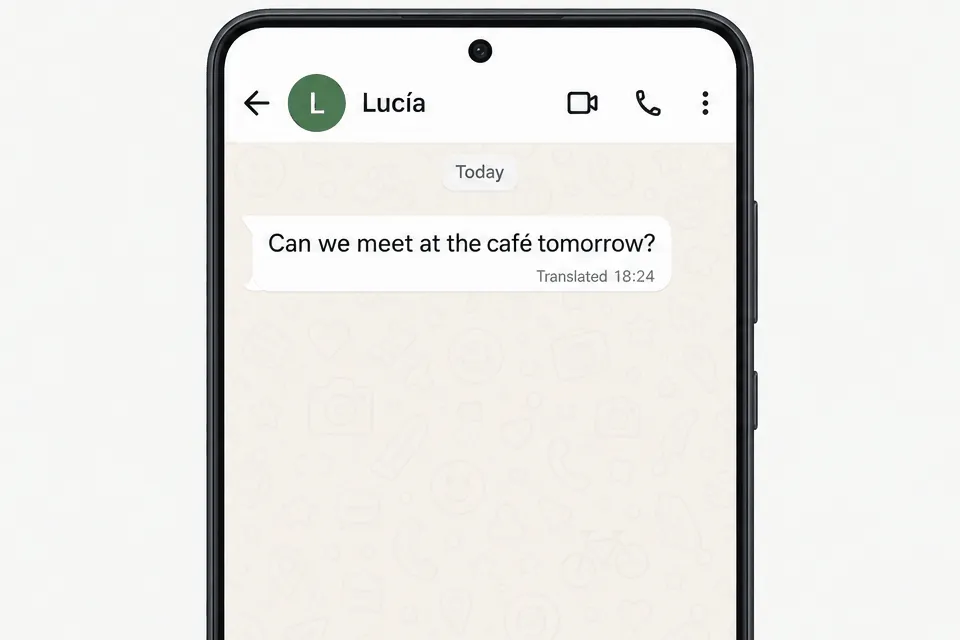
WhatsApp added message translations in September 2025. It works in one-on-one chats, groups and Channel updates, and the translation happens on your phone, so WhatsApp can’t see the text.
Here’s how to use it.
- Press and hold the message in Spanish.
- On Android, open the three-dot menu and tap Translate. On iPhone, tap More, then Translate.
- Pick Spanish as the source language and English as the target. The first time, your phone downloads a language pack, so do it on Wi‑Fi if you can.
On Android you can also turn on automatic translation for an entire conversation. From then on, new messages in that chat arrive already translated.
Android launched with six languages (English, Spanish, Hindi, Portuguese, Russian and Arabic) and iPhone with 19 or more, including French, German, Italian, Japanese and Chinese. So Spanish to English is covered on both. There are three catches, though. The rollout is gradual, and as of October 2026 some phones still don’t show the option. It isn’t available on WhatsApp Web or the desktop app. And it only translates what you receive, so you need something else to reply in Spanish. We go through the platform differences in Does WhatsApp have a translator?
2. Google Translate’s Tap to Translate and the Gboard keyboard
If the Translate option hasn’t reached your WhatsApp yet, Google Translate fills the gap on Android. Open the Google Translate app settings and turn on Tap to Translate. After that, whenever you copy a message in WhatsApp, a floating icon appears and shows you the English translation without leaving the chat.
For replies, Gboard (Google’s keyboard) has a translator built in. Open the keyboard menu, tap Translate, set it to English to Spanish and type in English. Gboard writes the Spanish version into the message box, and you choose whether to send it as is or tweak it first.
iPhone has no floating icon. There, this method comes down to copying the message and pasting it into the Google Translate app or Apple’s Translate app. The steps for each option are in how to use Google Translate with WhatsApp.
3. Copy and paste into a translator (works on WhatsApp Web too)
This one works anywhere. You copy the message, paste it into Google Translate, DeepL or whatever you prefer, read the result and, if you want to answer, do the same thing in reverse with your reply.
The problem is speed. Each reply takes about seven steps (copy, switch tabs, paste, type, copy the translation, go back to the chat, paste). That’s fine for one message. In a long conversation with a client in Mexico or your partner’s family in Colombia, it gets old fast.
There’s another catch. The translator sees each sentence on its own, with no idea what came before. A short “ahorita” can come out as “right now” when your contact actually meant “in a while”.
4. Translate WhatsApp Web messages to English with an extension
If you chat from your computer, the easiest option is an extension that translates inside the chat. TapScriber is a Spanish to English translator for WhatsApp Web that works in Chrome, Edge, Brave and other Chromium-based browsers.
With a chat in Spanish, it works like this.
- Install the extension from the Chrome Web Store and open web.whatsapp.com.
- Click Translate on a message in Spanish. The English translation shows up right below it, and the original stays in view.
- To reply, write in English and click Translate in the bar above the message box. You see your message in Spanish, edit it if you want, and click Use translation. You hit send yourself. TapScriber never sends anything on its own.
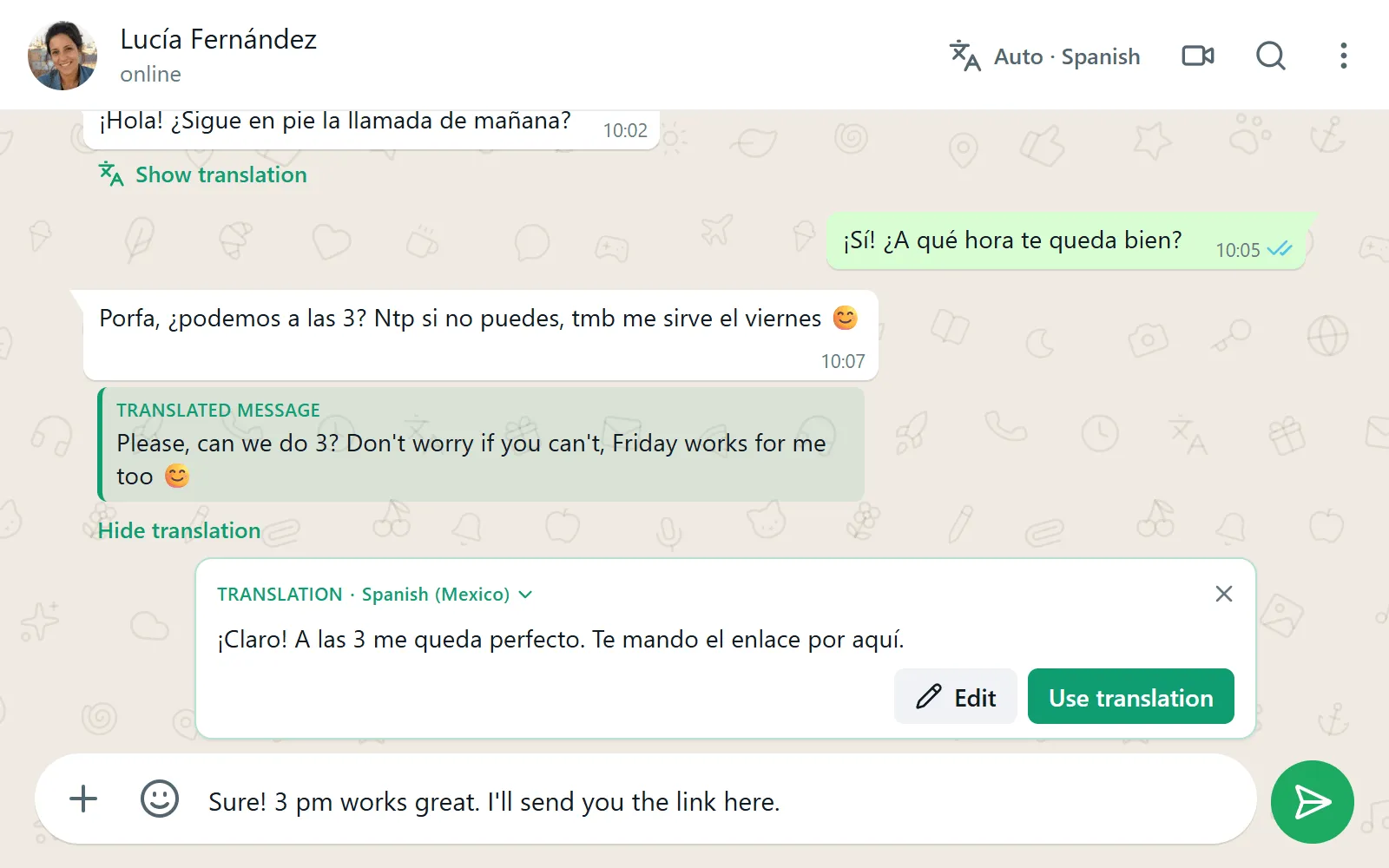
Each chat remembers its language. If you talk to one supplier in Spanish and another in Portuguese, you don’t have to change anything when you switch between them. It supports 25 languages and variants, including Spanish from Spain, Mexico, Argentina and Colombia, and English from the US and the UK. Your first 30 translations need no sign-up, and a free account gives you 300 a month.
It only translates text on WhatsApp Web, so voice messages and the phone app are out. For the full setup and troubleshooting, see our guide to translating WhatsApp Web messages.
Tips for translating Spanish to English on WhatsApp
Spanish on WhatsApp looks very little like textbook Spanish. Modern translators handle most of it, but these are the things that trip them up most often.
Spanish texting abbreviations
Spanish speakers shorten almost everything when they text. When a translation looks odd, one of these is usually the reason.
| In the chat | Full Spanish | In English |
|---|---|---|
| q, k | que | that, what |
| xq, pq | porque, por qué | because, why |
| tmb | también | also, too |
| x | por | for, by |
| dnd | dónde | where |
| bn | bien | good, fine |
| porfa, xfa | por favor | please |
| ntp | no te preocupes | don’t worry |
| tqm | te quiero mucho | love you lots |
| jaja, jsjs | (laughter) | haha |
Regional slang
Spanish changes a lot from one country to the next, and slang is where translators struggle most. A few you’ll see often.
- Ahorita (Mexico) can mean right now or in a little while. Context decides, and sometimes it means never.
- Vale (Spain) is simply OK.
- Che (Argentina) is a way to get someone’s attention, like hey.
- Parce (Colombia) means buddy or mate.
- Chévere, chido and guay all mean cool, in Venezuela and Colombia, Mexico and Spain respectively.
If a translated line reads strangely, look at the original. The odd word is usually slang.
False friends
Some Spanish words look like English ones but mean something else. A good translator usually gets them right, but they’re worth knowing if you read the original.
- Embarazada means pregnant, not embarrassed.
- Actualmente means currently, not actually.
- Constipado (in Spain) means having a cold.
- Éxito means success. The exit is la salida.
- Molestar means to bother, nothing more.
- Asistir means to attend. To assist is ayudar.
Dates and times
Spanish-speaking countries write the day first, so 07/10 is October 7, not July 10. Translators leave numbers alone (TapScriber protects them on purpose so they can’t change), which means the mix-up survives the translation. When you set a date, write the month as a word. Many people also use the 24-hour clock, so “a las 19” is 7 pm.
Replying in Spanish, tú or usted
English has one “you”. Spanish has tú (informal) and usted (formal), plus vos in Argentina, Uruguay and much of Central America. For several people, Latin America uses ustedes, while Spain uses vosotros with friends.
With friends and family, tú is normal. With a landlord, a client, a doctor or your partner’s grandparents, usted is the safer choice until they switch to tú. The way you write in English matters here. A polite message (“Could you please…”, “Thank you so much”) tends to come out formal, and a casual one comes out informal. TapScriber is built to keep the tone of what you write, but always read the Spanish before you send it. If you see tú where you wanted usted, edit it.
Choosing the right variant helps too. If your contact is in Argentina, setting the chat to Spanish (Argentina) gets you vos and local vocabulary. Spanish (Mexico) uses ustedes instead of vosotros. And keep your sentences short. Idioms like “break a leg” or “it’s a piece of cake” can come out word for word, while one plain sentence per idea almost never fails.
It’s not just Spanish
All four methods work the same way for Portuguese, French, Arabic, Hindi, Chinese and other languages. The difference is coverage. WhatsApp’s built-in translation supports a different list on Android and on iPhone, and TapScriber supports 25 languages and variants on WhatsApp Web.
Which method should you use?
If you only get the odd Spanish message on your phone, WhatsApp’s own Translate option is enough. If you also need to reply from your phone, add the Gboard translator. And if you chat from a computer or talk in Spanish every day, an extension saves you from copying and pasting every message and lets you check each reply before it goes out.
Frequently asked questions
Does WhatsApp translate Spanish to English?
Yes, in the Android and iPhone apps. Press and hold the message and tap Translate. The feature isn't available on WhatsApp Web or the desktop app.
How do I translate WhatsApp Web messages to English?
WhatsApp Web has no built-in translator. You can copy each message into a translator, or install an extension like TapScriber that shows the English translation right below the original message.
How do I reply in Spanish if I don't speak Spanish?
Write your reply in English and translate it before sending, with the Gboard keyboard translator on your phone or with TapScriber on WhatsApp Web. Read the translation before you send it, especially to a client or someone you don't know well.
Can WhatsApp translate every message in a chat automatically?
On Android you can turn on automatic translation for a whole chat. On iPhone you translate messages one at a time. On WhatsApp Web there is no native option, so you need an extension.


