Best WhatsApp Web Extensions for Chrome in 2026
By TapScriber Team
Published 13 min read

The best WhatsApp Web extensions depend on what you’re missing. If you worry about people reading your screen, the ones that blur your chats (Privacy Extension for WhatsApp Web or Blur & Lock) and WAIncognito are the most useful. If you use WhatsApp for work, Eazybe and Cooby connect it to your CRM and Blueticks schedules messages, and if you chat in another language a translator like TapScriber helps (it’s the extension we make). We checked every figure on the Chrome Web Store on October 7, 2026.
Our quick picks
- Keep your screen private. Privacy Extension for WhatsApp Web by WASBB or Blur & Lock.
- Read messages without the blue ticks. WAIncognito, which is open source.
- Several tools in one. Pragmaz for personal use, WA Web Plus if you sell on WhatsApp.
- Track customers and follow-ups. Eazybe or Cooby.
- Schedule messages. Blueticks, leaving its bulk sender alone.
- Read voice notes. Transcribe WhatsApp Audio with AI.
- Chat in another language. TapScriber, our own extension.
How we picked these extensions
We searched the Chrome Web Store by category and opened the listing of every candidate. To make the list, an extension had to meet these conditions.
- An update in the last few months. WhatsApp Web changes often, and an extension that hasn’t been touched in a year is usually broken or about to break.
- An identifiable developer, with a website, an email address or a company name you can see.
- Reviews from real users and an install count that makes sense for what it promises.
- A privacy policy that explains what happens to your messages.
- Bulk messaging can’t be its main feature.
Nobody paid to be included. User counts and ratings are what the Store showed on October 7, 2026, and they change every day. Where a listing doesn’t state a price, we say so instead of guessing.
Before you install anything, check what WhatsApp Web already does
A lot of lists recommend extensions for things WhatsApp Web now does on its own. Before you give a third party access to your chats, look through the settings.
- Dark mode. It’s in WhatsApp Web’s settings, under Theme.
- Password lock. Under Settings, Privacy, you’ll find Screen lock, which asks for a password after a period of inactivity.
- Last seen, online status and read receipts. You can hide them under Privacy, same as on your phone.
- Chat filters. Unread, Favorites, Groups and your own lists.
- Labels. They’re built in if you use WhatsApp Business.
- Exporting a chat. You do it from the phone app, which creates a text file with or without attachments.
If what you need is on this list, you don’t need an extension at all.
Privacy extensions for WhatsApp Web
This is the most searched category, and for good reason. If you work in an open office or a café, or share your screen on video calls, anyone can glance at your chats.
Privacy Extension for WhatsApp Web (WASBB)
It blurs names, profile pictures, messages, media and whatever you’re typing, and reveals them when you hover. It also adds a password lock and locks automatically after a period of inactivity. It has 40,000 users, a 4.7 out of 5 rating from 1,200 reviews and the Store’s Featured badge, and its latest version is from August 1, 2026. The developer states that it doesn’t collect data.
Blur & Lock
It does the same job with one practical extra. Everything blurs by itself when you stop moving the mouse (you pick a timer between 15 seconds and 5 minutes), and you can set a four-digit PIN. It’s made by Hotzapp, has 9,000 users and a 4.9 rating from 93 reviews, and was updated on September 30, 2026.
Privacy Extension For WhatsApp Web (the original)
This is the most installed one by far, with 1,000,000 users, and it’s open source under the MIT license. Its rating has dropped to 2.8 because several WhatsApp updates broke it for a while, though it was updated on August 3, 2026 and recent reviews say it works again. If you prefer open source, it’s a good choice. If you want the one that breaks least, pick one of the two above.
WAIncognito
Instead of blurring, it controls what other people see about you. You can read messages and statuses without sending read receipts, hide “typing” and last seen, and still see other people’s blue ticks (the official setting doesn’t let you do that). It’s open source, its policy says no data is ever transmitted anywhere, and it has 100,000 users, a 3.8 rating from 314 reviews and an update from September 30, 2026.
There’s another extension with the same name from a different developer, with 4,000 users and no update since January 2025. Install the one by Tomer H., which is the one we link to. It can also restore deleted messages, and whether you want to read something the other person chose to remove is up to you.
All-in-one extensions
Pragmaz
It adds a menu above your chat list with several free tools. You can message a number without saving it, use more than one account in the same tab, export a chat to an HTML file with its photos (optionally password protected), post statuses and switch themes. Professional features are paid. It has 100,000 users, a 4.0 rating from 3,500 reviews and was updated on October 1, 2026.
WA Web Plus
This is the WhatsApp Web extension with the most users, 2,000,000, and a 4.6 rating from around 52,000 reviews. Today it’s aimed at businesses. Its website lists message broadcasting, auto replies, scheduled messages, contact and group export and restoring deleted messages, with a free start and paid plans. It was updated on September 16, 2026. Watch out for lookalikes, because several extensions on the Store are called “WA Web Plus” and aren’t from the same developer (Elbruz Technologies).
CRM, labels and sales
If you deal with customers from your own WhatsApp number, these extensions add tabs, notes, reminders and a link to your CRM.
- Eazybe. Syncs chats with HubSpot, Zoho, Salesforce, Pipedrive or Google Sheets and has an AI assistant that flags contacts waiting for a reply. Free to install, with the more advanced AI agents on paid plans. 30,000 users, 4.5 from 1,100 reviews, updated October 6, 2026.
- Cooby. Automatic tabs (unread, needs reply, groups), notes, reminders and conversation logging in HubSpot. There’s a free plan and paid plans. 20,000 users, 4.6 from 137 reviews, updated October 1, 2026.
- WAPlus CRM. Sorts chats by label, keeps customer cards and connects to HubSpot, Salesforce and Zoho. The basic features are free. 80,000 users, 4.9 from 4,000 reviews, updated September 26, 2026.
- Weka. A small alternative that describes itself as completely free, with tabs, notes, quick replies and reminders. It only has 600 users, but it was updated on October 5, 2026 and its listing explains why it asks for the tabs permission.
Scheduling messages, and why we don’t recommend bulk sending
Blueticks is the go-to tool for scheduling messages on WhatsApp Web. You can set a message for a specific date and time, create recurring messages and turn chats into tasks. It has a free plan with no time limit and paid plans. Its rating is 3.0 from 403 reviews with 60,000 users, and it was updated on October 6, 2026.
Blueticks, WA Web Plus and Cooby also offer campaigns or broadcasts to many contacts at once. It’s worth being clear here. WhatsApp’s terms forbid bulk and automated messaging, and accounts that do it get banned, especially when recipients report the messages as spam. In October 2025, the security firm Socket found 131 Chrome extensions built to spam people through WhatsApp Web while dodging those limits, as Malwarebytes reported. If you need to reach hundreds of customers, the safe route is the official WhatsApp Business API, not an extension.
Exporting WhatsApp Web chats
Start with the official option, Export chat in the phone app. If you’d rather do it from your computer or need other formats, there are two solid options.
- ChatBackup for WhatsApp. Downloads a chat to CSV or HTML with photos and files, and says everything is processed in your browser. The paid version raises the limit to 100,000 messages. 7,000 users, 3.5 from 39 reviews, updated October 6, 2026.
- Pragmaz. Its HTML export with built-in search is free and is one of the features described above.
Dark mode and themes
WhatsApp Web already has dark mode, so an extension only makes sense if you want more. Pragmaz includes a theme gallery. WhatsApp Web Designer lets you set your own backgrounds for chats and the contact list, although it’s small (1,000 users, 3.8 from 16 reviews). If you want every website dark, Dark Reader is the most popular option, with 7,000,000 users and a 4.7 rating.
Transcribing voice notes
The phone app already transcribes voice notes. On a computer, Transcribe WhatsApp Audio with AI shows the text under each voice message as soon as it loads. It has 10,000 users, a 4.6 rating from 203 reviews, the Featured badge and in-app purchases, and it was updated on September 27, 2026.
Translating messages on WhatsApp Web
WhatsApp Web has no translator of its own (WhatsApp’s translation only exists on phones, as we explain in Does WhatsApp have a translator?), so on a computer you need an extension. This is where ours comes in. We’ve put it in its category with the alternatives next to it so you can compare.
TapScriber
It adds a Translate button under every message in another language and shows the translation below the original instead of replacing it. When you type, a bar translates your draft so you can review it, edit it and decide whether to use it. You always press send yourself. It supports 25 languages and regional variants, and each chat remembers its language. There are 30 trial translations without an account, 300 a month with a free account and a Pro plan with no limits.
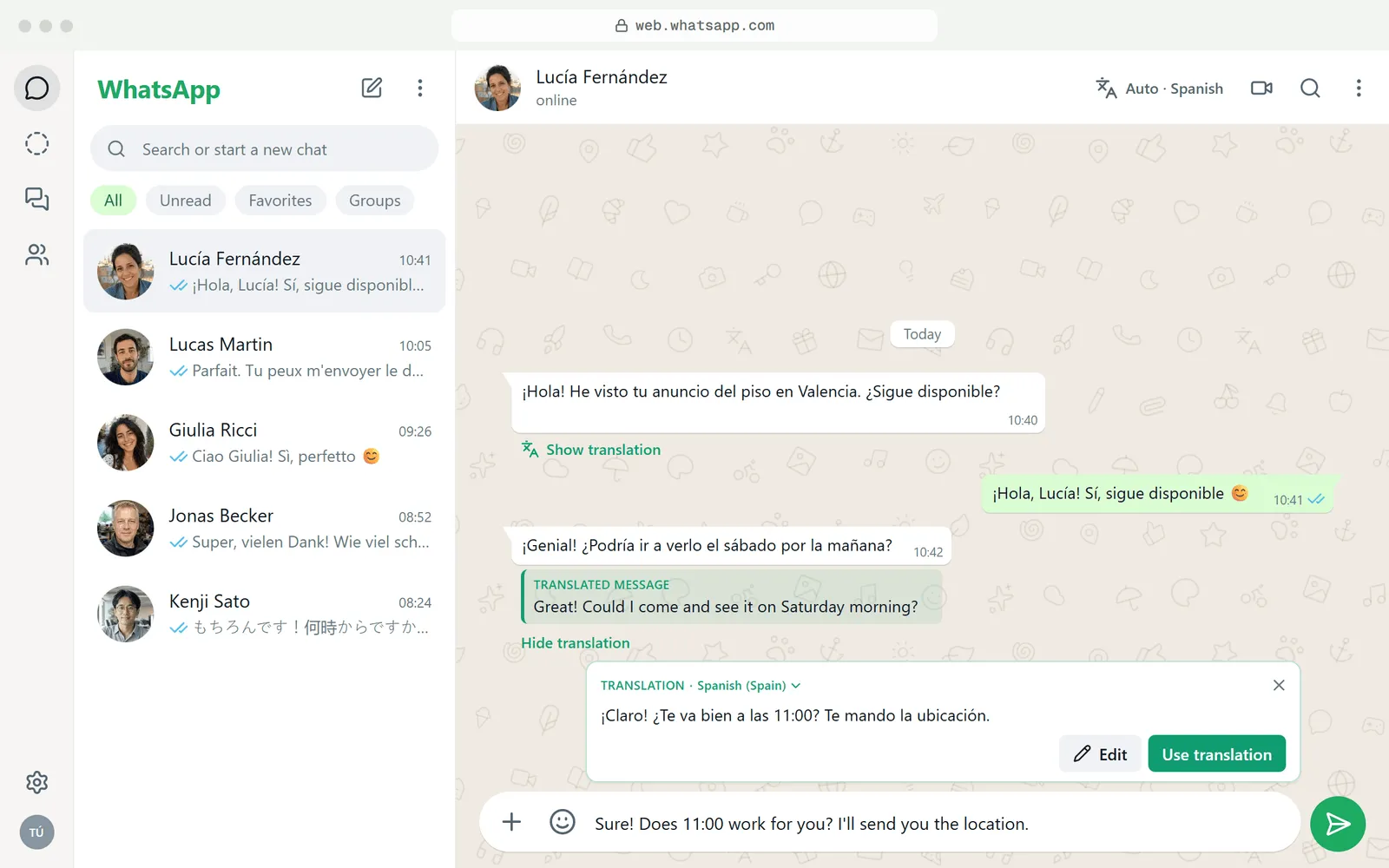
Only the message you tap Translate on, or the draft you choose to translate, is sent to our server, and it isn’t stored. Today it doesn’t translate voice messages and doesn’t work in the mobile app. It’s a new extension, so it doesn’t have a user count worth showing yet. For a step-by-step walkthrough, see the guide to translating WhatsApp Web messages, and the WhatsApp Web translator page has everything else.
Other translation options
- WhatsApp Web Translator. Automatically translates the messages you receive and send, with 50 free messages. Before you let replies go out translated without a check, read why auto-sending translations is risky. 3,000 users, 4.7 from 100 reviews, updated September 28, 2026.
- The Best Translator for WhatsApp Web. Several translation engines and a keyboard shortcut to translate what you type. 40,000 users, 4.9 from 63 reviews, updated August 18, 2026. The same developer publishes a near-identical listing under another name.
- Google Translate. Google’s own extension isn’t built for WhatsApp, but it translates any text you select. Free, 38,000,000 users and a 4.2 rating. We cover how to make it work in a chat in how to use Google Translate with WhatsApp.
WhatsApp Web extensions compared
| Extension | What it’s for | Users | Rating | Price | Updated |
|---|---|---|---|---|---|
| Privacy Extension for WhatsApp Web (WASBB) | Blur and password lock | 40,000 | 4.7 (1,200) | Not stated on the listing | Aug 1, 2026 |
| Blur & Lock | Blur and PIN lock | 9,000 | 4.9 (93) | Not stated on the listing | Sep 30, 2026 |
| Privacy Extension For WhatsApp Web | Blur, open source | 1,000,000 | 2.8 (1,200) | Free | Aug 3, 2026 |
| WAIncognito | Read receipts and online status | 100,000 | 3.8 (314) | Free, open source | Sep 30, 2026 |
| Pragmaz | Multiple accounts, themes, export | 100,000 | 4.0 (3,500) | Free with paid features | Oct 1, 2026 |
| WA Web Plus | Business tools | 2,000,000 | 4.6 (52,000) | Free with paid plans | Sep 16, 2026 |
| Eazybe | CRM and AI | 30,000 | 4.5 (1,100) | Free with paid plans | Oct 6, 2026 |
| Cooby | Tabs, reminders, HubSpot | 20,000 | 4.6 (137) | Free with paid plans | Oct 1, 2026 |
| WAPlus CRM | Labels and customer cards | 80,000 | 4.9 (4,000) | Basic features free | Sep 26, 2026 |
| Blueticks | Scheduling messages | 60,000 | 3.0 (403) | Free with paid plans | Oct 6, 2026 |
| ChatBackup for WhatsApp | Export to CSV or HTML | 7,000 | 3.5 (39) | Free with paid version | Oct 6, 2026 |
| Transcribe WhatsApp Audio with AI | Voice note transcription | 10,000 | 4.6 (203) | In-app purchases | Sep 27, 2026 |
| TapScriber (ours) | Translating messages and replies | New | No data yet | 30 free translations, 300 a month with an account | Oct 5, 2026 |
| WhatsApp Web Translator | Automatic translation | 3,000 | 4.7 (100) | 50 free messages | Sep 28, 2026 |
Chrome Web Store data as of October 7, 2026.
How to tell if a WhatsApp Web extension is safe
An extension that runs on web.whatsapp.com can read everything you see in that tab, messages and contacts included. You don’t need to distrust all of them, but check five things before you click Add.
- Who publishes it. Scroll to the details section of the listing. A company with an address, its own website or a public code repository is more reassuring than a generic email address. If the developer has declared itself a trader (shown as “Trader” in the European Union), it has committed to follow EU consumer law.
- When it was last updated. If the latest version is more than six months old, it probably struggles with the current WhatsApp Web.
- What permissions it asks for. When you install it, Chrome warns you about what it will be able to do. It’s reasonable for it to read and change your data on web.whatsapp.com and, at most, on its own service’s website. If it wants access to all websites or your browsing history for something that only touches WhatsApp, be suspicious. As an example, TapScriber only asks for access to web.whatsapp.com, our API and the extension’s local storage.
- What it does with your messages. Read the privacy practices section of the listing and the developer’s policy. Extensions that blur or change the theme can work without sending anything off your computer. Ones that translate or transcribe usually need to send that text or audio to a server, and they should tell you whether they keep it.
- Recent reviews. Sort by newest. A high average with complaints from last week tells you more than the total count.
Be wary of copied names too. While reviewing, we found several extensions called WA Web Plus or WAIncognito from different developers. And the fewer extensions you run on WhatsApp Web, the better, because they can clash with each other (one even says so in its own listing) and each one is another door into your chats.
Once they’re installed, Chrome’s Safety Check, under Privacy and security in settings, warns you if an extension has been taken down from the Store or flagged as malware.
How to install and manage extensions in Chrome, Edge and Brave
Installing
- Open the extension’s listing on the Chrome Web Store and click “Add to Chrome”.
- Read the permissions prompt and confirm.
- Reload the WhatsApp Web tab (F5) so the extension kicks in.
In Brave and Vivaldi it works the same way. In Edge, the first time you’ll see a prompt to allow extensions from other stores, so accept it and click the button again. Opera needs its own add-on for installing Chrome extensions first. Firefox has its own store, and not every extension here has a Firefox version. The WhatsApp apps for Windows and Mac don’t support extensions, so you need to use the browser.
Managing
- Pin the icon. Click the puzzle piece in the toolbar and the pin next to the extension.
- Limit where it runs. In chrome://extensions (or edge://extensions and brave://extensions), open Details and under Site access choose to run it only on web.whatsapp.com or on click.
- Turn it off without removing it. Use the toggle for each extension on that same page. It’s the first thing to try if WhatsApp Web starts misbehaving.
- Remove it. Click Remove on that page, or right-click the icon and choose “Remove from Chrome”.
What we left out
Some extensions show up on almost every list, but we wouldn’t recommend them today. Notifier for WhatsApp Web hasn’t been updated since September 2024, and WhatsApp Web already shows desktop notifications on its own. SessionBox One handles multiple accounts, but it’s marketed as an anti-detect tool and its latest version is from August 2025. For multiple accounts, a second browser profile does the same job with nothing to install. Bulk senders and contact scrapers aren’t here either, because of the ban risk we explained above.
If what you need is to talk with people in another language, TapScriber’s WhatsApp Web translator is free to try without an account, with the original always in view.
Frequently asked questions
Are WhatsApp Web extensions safe?
It depends on who publishes them. Any extension that runs on web.whatsapp.com can see your chats, so stick to ones with an identifiable developer, recent updates, permissions limited to WhatsApp and a clear privacy policy about your message text.
Can WhatsApp ban me for using an extension?
Extensions that only change what you see (blurring, themes, translation) don't send anything on your behalf. The real risk comes from tools that send bulk or automated messages, because WhatsApp's terms forbid them and accounts that use them often get banned.
Do extensions work in the WhatsApp desktop app or on my phone?
No. Extensions only work on WhatsApp Web opened in a desktop browser such as Chrome, Edge or Brave. The Windows and Mac apps and the mobile apps don't support extensions.
What is the best privacy extension for WhatsApp Web?
To stop people reading your screen, Privacy Extension for WhatsApp Web by WASBB and Blur & Lock have the best ratings as of October 2026. To control when you send read receipts, WAIncognito is open source and doesn't send data to any server.
Can I use two WhatsApp Web accounts in the same browser?
Not in the same tab, unless you use an extension like Pragmaz. The simplest way, with nothing to install, is to create a second profile in Chrome, Edge or Brave and open WhatsApp Web in each profile with a different account.


