WhatsApp Auto Translate, How to Turn It On and Off
By TapScriber Team
Published 7 min read

WhatsApp can auto translate messages, but only on Android and only chat by chat. You translate one message in a conversation, then switch on the option to translate all new messages in that chat, and from then on incoming messages show up in your language. As of October 2026, iPhone only translates one message at a time, and WhatsApp Web and the desktop apps have no translation at all.
Further down are the steps to turn it on and off, what “automatic” covers, and your options if you chat from a computer.
Does WhatsApp automatically translate messages?
Not by default. WhatsApp added message translations in September 2025, and the basic version is manual. You long-press a message and tap Translate. The automatic part is an extra setting that WhatsApp only offers on Android, and you turn it on for one conversation at a time.
Here is where each platform stands today.
| Platform | Translate a single message | Auto translate a whole chat |
|---|---|---|
| Android | Yes, long-press and tap Translate | Yes, per chat |
| iPhone | Yes, long-press and tap Translate | No (in development, per beta reports) |
| WhatsApp Web | No | No |
| Windows and Mac apps | No | No |
Translation happens on your phone with downloaded language packs. WhatsApp says it can’t see the translations, so your chats stay end-to-end encrypted. If you want the bigger picture of what WhatsApp’s built-in translator can and can’t do, we cover it in Does WhatsApp have a translator?, and if you only need to translate a single message, how to translate WhatsApp messages has the steps for each phone.
How to turn on auto translate in WhatsApp (Android)
- Update WhatsApp from the Google Play Store. The feature rolled out gradually, so an older version may not have it.
- Open the chat you want translated and long-press a message written in another language.
- Tap Translate. If WhatsApp asks, pick the language to translate from and into, and download the language pack.
- In the translation options that appear, turn on the switch to translate all new messages in this chat.
From that point, new messages you receive in that chat appear translated. Other chats stay as they were, so you need to repeat this in each conversation where you want it.
WhatsApp hasn’t published a step-by-step Help Center page for this that we could find, and the wording changes between versions. If the switch isn’t in the language picker, open the chat’s three-dot menu or tap the contact’s name to open chat info, and look for the translation setting there.
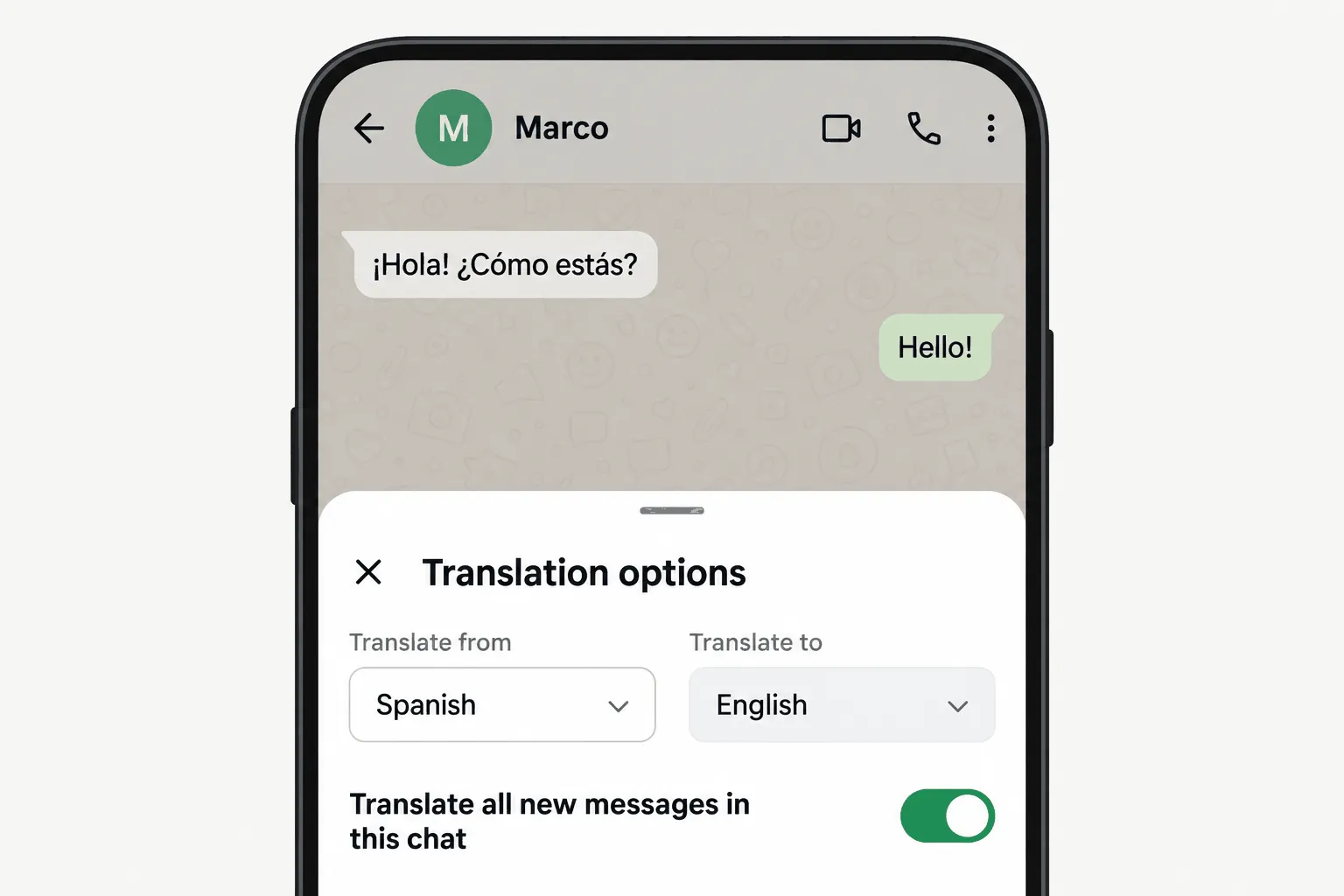
How to turn off auto translate in WhatsApp
Go back to the same chat and open the translation options the same way (long-press a translated message, or check chat info). Switch off the option to translate new messages. New messages will arrive in their original language again.
Because it’s a per chat setting, turning it off in one conversation doesn’t change any other. If you only want to see the original of a single translated message, long-press it and use the translation option to switch views instead of turning the whole feature off. And if you see translations you never turned on, they usually come from your keyboard or phone (Galaxy AI, Google Translate), as we explain in why WhatsApp is translating your messages.
What about auto translate on iPhone?
For now, iPhone users can only translate one message at a time. Long-press the message, tap Translate (on some versions it’s under More), and choose the languages. WhatsApp uses Apple’s own translation system on iOS, which is why the iPhone version supports more languages than Android did at launch.
An automatic option is on the way, but it isn’t out yet. In March 2026 WABetaInfo found a per chat setting in an iOS beta that would translate new incoming messages from the chat info screen, and said it was still under development and not available to testers. Their report also says it would only work in groups where everyone writes in the same language.
Which languages can WhatsApp auto translate?
On Android, WhatsApp launched with six languages. They were English, Spanish, Hindi, Portuguese, Russian and Arabic. In March 2026 WABetaInfo reported 13 more language packs in the Android beta, including German, French, Italian, Dutch, Polish, Turkish, Ukrainian and Simplified Chinese. On iPhone the list follows Apple’s translation languages, which were 19 or more at launch.
Availability depends on your app version and your phone, so the language picker inside WhatsApp is the most reliable list. If your pair isn’t there, you can’t auto translate that chat yet.
What “automatic” really means on WhatsApp
It only covers messages you receive
WhatsApp’s auto translate is for reading. It translates incoming messages into your language, and that’s it. When you reply, you still type in whatever language the other person needs to read. There’s no setting that translates your outgoing messages, automatic or otherwise.
It also skips things that aren’t text. Voice messages, stickers, documents, locations and GIFs aren’t translated. For voice notes, the closest you get is WhatsApp’s transcription feature, which turns the audio into text in a few supported languages.
Why sending translations automatically is risky
Plenty of people search for a way to have their replies translated and sent in one go. Some third-party tools offer exactly that, and it’s worth thinking twice before using one.
Machine translation is very good with everyday sentences and still gets things wrong in ways you won’t notice if you don’t speak the language. A price can come out ambiguous, a name can get translated as a word, a casual “sure” can sound cold, and a false friend can say something you never meant. If the translation goes straight to the chat, the other person reads the mistake before you do. With a client or a landlord that’s more than awkward.
The safer pattern is to see the translation first, fix anything that looks off, and only then hit send yourself. That extra second is what keeps a translator from speaking for you.
Auto translate on WhatsApp Web and desktop
On a computer, WhatsApp itself won’t translate anything, and there’s no announced date for translation on WhatsApp Web or in the Windows and Mac apps. The desktop apps don’t accept browser extensions, so if you want translation on a computer, use web.whatsapp.com in your browser.
There, you have a few real options.
- Your browser’s page translation. Right-click and choose “Translate to English” in Chrome or Edge. It translates everything on screen, including names and menus, replaces the original text and does nothing for what you type.
- Copy and paste into Google Translate or DeepL. It works for any message and for your replies, but you switch tabs for every single one.
- A translation extension built for WhatsApp Web. It adds translation inside the chat. Quality, privacy and upkeep vary a lot, so check who makes it, when it was last updated and what it does with your messages (we compare several in the best WhatsApp Web extensions).
TapScriber is a translation extension for WhatsApp Web in that third group, and it handles “automatic” differently from WhatsApp on Android. What it does on its own is figure out the language. It detects the language of incoming messages right in your browser, adds a Translate button under the ones in another language and leaves alone the ones it can confirm are already in yours. The translation itself happens when you click, so only the messages you choose are sent to be translated. The rest of the conversation never leaves your browser, and the text isn’t stored.
Each chat also remembers its language. After a couple of messages from a contact, TapScriber learns which language they write in (if they haven’t written yet, it makes a guess from their phone prefix). If they switch languages later, it suggests the change instead of making it behind your back. You can set the language by hand or turn TapScriber off for a chat from the language button in the chat header.
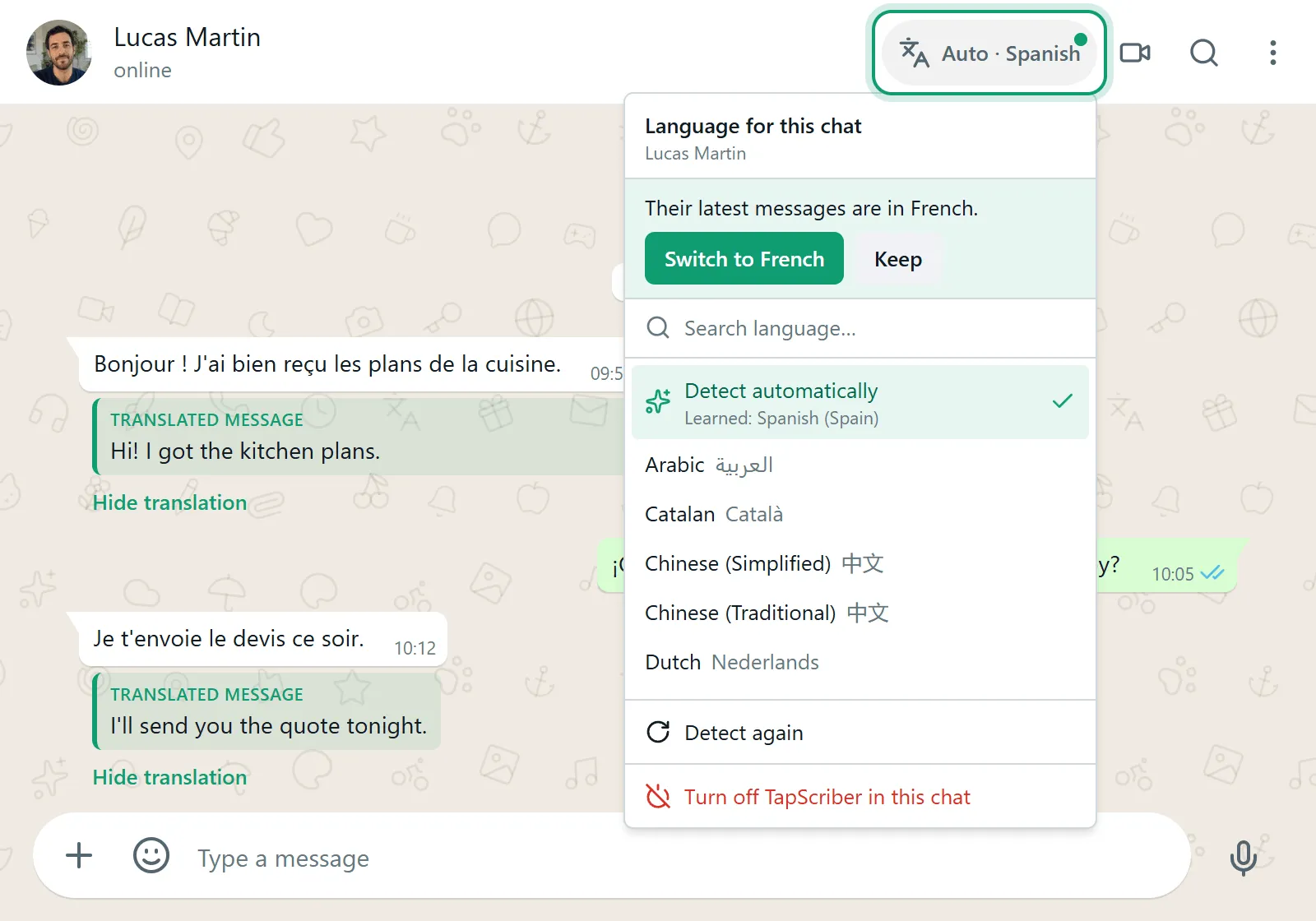
For replies, you type in your own language and click Translate in the bar above the message box. You see the translation, edit it if you want, then click Use translation to put it in the box. Sending is always up to you, because TapScriber never sends anything on its own.
It works in Chrome, Edge, Brave and other Chromium browsers on desktop, with 25 languages and regional variants. Voice messages and the phone app are out of scope. The install and every button, step by step, are in how to translate WhatsApp Web messages.
Which option fits you
If you mostly chat on an Android phone and only need to read messages in another language, WhatsApp’s own auto translate is the easiest choice. It’s free, private and already in the app. On iPhone you’ll have to translate message by message for now.
If you chat from a computer, or you need to write back in the other person’s language without copying and pasting, you need something on WhatsApp Web. You can add TapScriber to Chrome and make your first 30 translations without signing up. A free account raises that to 300 a month.
Frequently asked questions
Does WhatsApp automatically translate messages?
Only if you turn it on, and only on Android. Android lets you auto translate new incoming messages in a specific chat, iPhone translates one message at a time, and WhatsApp Web and the desktop apps have no translation at all.
How do I turn off auto translate on WhatsApp?
Open the chat where it's on and switch off the option to translate new messages in the same translation settings where you turned it on. It's a per chat setting, so other chats aren't affected.
Is there auto translate for WhatsApp on iPhone?
Not yet. iPhone users can long-press a message and tap Translate, and WABetaInfo has reported that WhatsApp is building a per chat automatic option for iOS, but it hasn't been released.
Can WhatsApp auto translate the messages I send?
No. WhatsApp's translation only works on messages you receive. To reply in another language you need a separate translator, or on WhatsApp Web an extension like TapScriber that shows you the translated reply before you send it.
Does WhatsApp Web have auto translate?
No. WhatsApp hasn't brought message translation to WhatsApp Web or the Windows and Mac apps. On the web you can use your browser's page translation or a translation extension.


